
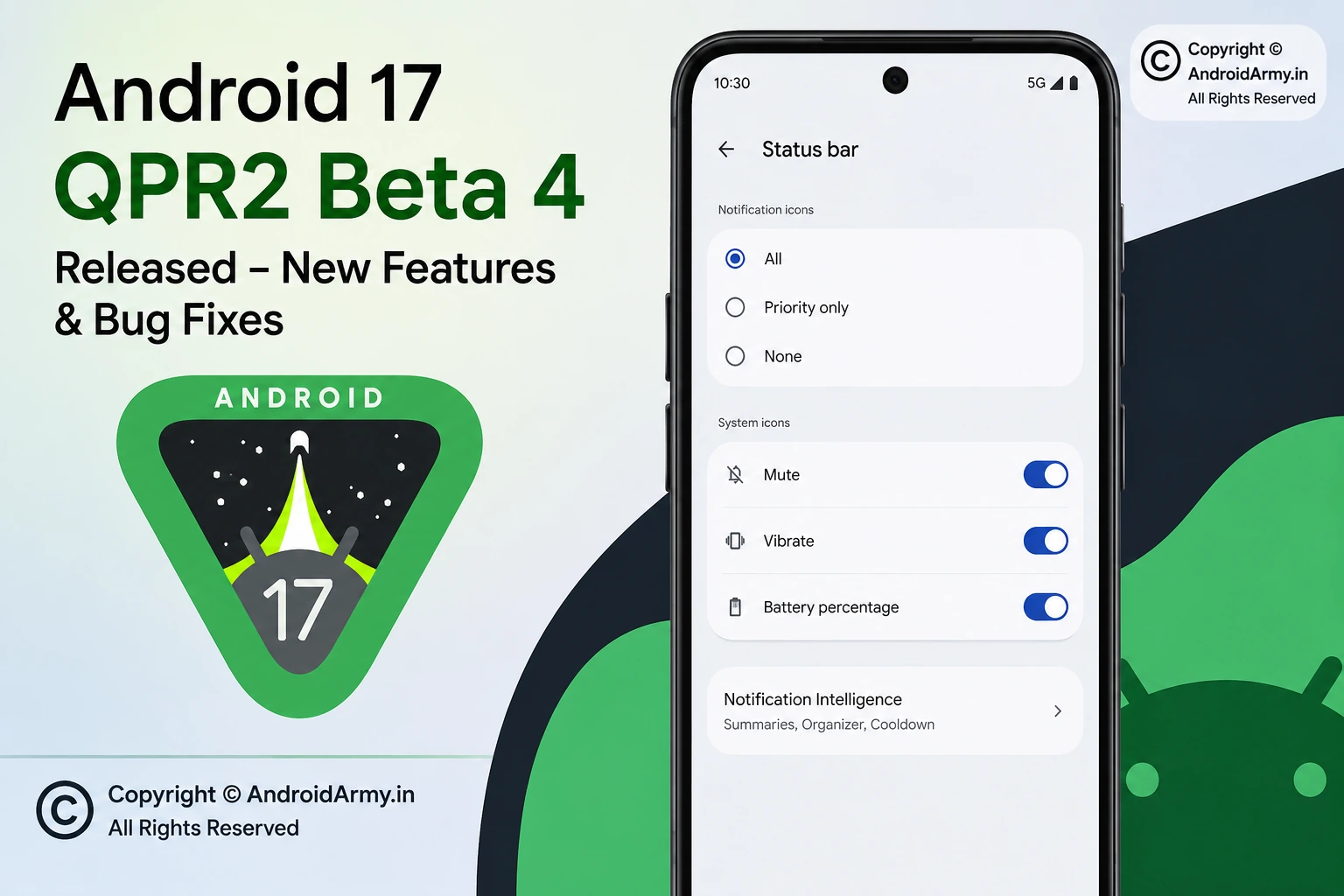
Google has released Android 17 QPR2 Beta 4 for supported Pixel devices, and this is an important milestone in the QPR2 development cycle. Released on August 28, 2026, the update brings new status bar controls, a reorganized Notification Intelligence section, additional interface changes, security improvements, and a substantial list of bug fixes. Google also says Android 17 QPR2 includes a minor SDK release with no planned behavior changes that would require major compatibility work.
Information checked on: August 30, 2026.
The biggest practical change for Pixel users is the new Status bar settings, which let users decide how notification and selected system icons appear. For developers, the more important milestone is that QPR2 Beta 4 brings the release to Platform Stability, meaning the API surface and app-facing behavior are effectively locked for this release cycle.
What is new in Android 17 QPR2 Beta 4?
New Status bar controls
Android 17 QPR2 Beta 4 adds a dedicated Status bar settings area. According to reporting based on the beta build, users can control which notification icons are displayed at the top of the screen.
The notification-icon setting offers three choices:
- All — show all notification icons.
- Priority only — show only priority notification icons.
- None — hide notification icons from the status bar.
The beta also brings controls for selected system indicators, including Mute, Vibrate, and Battery percentage. The controls do not provide complete customization of every status-bar icon, so this is better described as a first step toward greater Pixel status-bar customization rather than a full status-bar customization system.
This change could be particularly useful for users who receive a large number of notifications and want a cleaner status bar without disabling notifications entirely.
Notification Intelligence gets its own section
Another visible change is a new Notification Intelligence section in Settings.
The menu brings together Google’s existing notification-related AI features, including Notification Summaries, Notification Organizer, and Notification Cooldown. The beta therefore appears to be reorganizing these capabilities into a more clearly defined area rather than introducing every underlying feature from scratch.
That distinction matters: users should not assume that every item inside Notification Intelligence is a completely new feature in Beta 4.
More small interface changes
Beta 4 also includes several smaller user-interface changes. Reports from the build identify a new Voice Broadcast Quick Settings tile, updated badges in Wallpaper & style, and a tweak to the long-press menu. These are relatively minor compared with the status-bar controls, but they show that Google is continuing to polish the Pixel interface during the QPR2 cycle.
Android 17 QPR2 Beta 4 reaches Platform Stability
For developers, this is arguably the most significant part of the update.
Android 17 QPR2 has reached Platform Stability with Beta 4. In practical terms, this is the stage where developers can work against the finalized API surface and app-facing behavior planned for the release instead of preparing for major API changes later in the beta cycle.
Google’s official release notes say Android 17 QPR2 contains a minor SDK release and that the incremental update has no planned behavior changes, reducing the amount of compatibility testing developers need to perform.
For Android developers, that makes Beta 4 a useful build for final compatibility checks, regression testing, and preparing apps for the eventual stable QPR2 release.
Android 17 QPR2 Beta 4 bug fixes
Google’s official release notes list a substantial set of fixes in Beta 4. The most important ones include:
- Fixed a problem that could leave the launcher with a transparent status bar after fullscreen video playback when the “render apps below the cutout area” developer setting was enabled.
- Fixed a thermal-management problem that could cause devices to overheat and unexpectedly reboot.
- Fixed an issue preventing screen mirroring to external USB-C XR glasses.
- Fixed cases where gesture navigation became unresponsive when apps were rendered below the display cutout.
- Fixed excessive charging times near the final 2% when the 80% battery limit optimization was enabled.
- Fixed a Pixel Launcher problem where searching for apps in the app drawer could fail to accept text input.
- Fixed a missing background-blur effect behind the navigation bar when opening the power menu with hardware buttons.
- Fixed an issue where phone-call audio could incorrectly switch to the phone’s speaker instead of a connected Bluetooth device.
- Fixed a Recents screen rendering problem where the first task card could freeze or become visually clipped.
- Fixed an audio-service resource-lock problem that could prevent microphone access across apps after screen recording until the device was restarted.
- Fixed a System UI animation inconsistency when turning off the screen from the home screen.
- Fixed a dark-mode rendering issue affecting the visibility of the connected Wi-Fi settings icon.
- Fixed a problem where enabling 3D mode with connected smart glasses could produce a blank screen.
- Fixed an issue that prevented the notification bar from being pulled down completely.
- Fixed a WebGL-related browser crash or freeze involving PowerVR GPU driver processing.
- Fixed low-light Face Unlock failures that could bypass fingerprint authentication and force users to enter their PIN.
The fixes cover several areas at once, including System UI, thermals, charging, Bluetooth audio, notifications, graphics, biometric authentication, external displays, and Pixel Launcher.
A security improvement for call forwarding
Android 17 QPR2 also introduces a security change designed to reduce the risk of call-forwarding fraud.
Google is restricting programmatic use of call-forwarding USSD codes through TelephonyManager.sendUssdRequest(). Standard apps that attempt to execute restricted call-forwarding codes in the background using only the CALL_PHONE permission can receive a USSD_ERROR_NOT_ALLOWED callback.
Google is also adding an OS-level confirmation dialog when users manually dial call-forwarding codes through the system dialer. The goal is to make social-engineering attacks involving call forwarding harder to execute without the user’s knowledge.
Importantly, Google says non-call-forwarding USSD requests, including services such as mobile-money transfers and account checks, are not affected by this restriction.
Android 17 QPR2 Beta 4 build details
Google lists the following details for Beta 4:
| Item | Details |
|---|---|
| Release date | August 28, 2026 |
| Builds | CP41.260814.003.A2 / CP41.260814.003.B1 |
| Security patch | August 5, 2026 |
| Google Play services | 26.28.33 |
| Emulator | x86 64-bit and ARM v8-A |
Which Pixel phones can get Android 17 QPR2?
Google’s Android 17 QPR2 OTA documentation lists supported Pixel devices including the Pixel 6a, Pixel 7 series, Pixel Tablet, Pixel Fold, Pixel 8 series, Pixel 9 series, and Pixel 10 series, including the Pixel 10a.
The official QPR2 GSI documentation also lists the devices validated against the QPR2 GSI builds, including Pixel 6a through the Pixel 10 family. However, a GSI (Generic System Image) is primarily a developer testing tool and should not be confused with the normal consumer beta OTA.
How to install Android 17 QPR2 Beta 4
The safest approach for ordinary Pixel users is to use the Android Beta for Pixel program rather than manually flashing a system image.
If your supported Pixel is already enrolled in the beta program, the Beta 4 update can be delivered as an OTA update.
If you are considering joining the beta:
- Back up important data first.
- Enroll your compatible Pixel in the Android Beta for Pixel program.
- Check for the available Android 17 QPR2 beta update.
- Download and install the OTA update.
- Restart the phone when prompted.
- After installation, check the build number under Settings > About phone.
Google also provides OTA and factory images for developers and advanced users. Manual flashing is more appropriate when you specifically need control over the testing environment. Google warns that flashing beta images can involve a device reset, so users should back up their data before proceeding.
Should you install Android 17 QPR2 Beta 4?
If you are a developer, Android enthusiast, or Pixel user who specifically wants to test upcoming QPR2 changes, Beta 4 is a meaningful release because of the Platform Stability milestone and the large number of fixes.
For users who depend on their phone for work, banking, travel, or other critical tasks, the normal stable Android release remains the safer choice. A beta build can still contain bugs even after reaching Platform Stability.
The new status-bar controls are useful, but they are not enough by themselves to justify moving a primary phone onto beta software.
What Android 17 QPR2 Beta 4 means for Pixel users
Android 17 QPR2 Beta 4 is less about a dramatic visual redesign and more about polishing Android 17 before the next stable quarterly release.
The new Status bar controls are the most immediately visible addition. Notification Intelligence provides a cleaner home for existing notification-management features, while the Voice Broadcast tile and smaller UI adjustments add further polish.
Under the surface, the update is arguably more important. Google has fixed problems involving overheating and unexpected restarts, charging, Bluetooth audio, gesture navigation, screen recording, Face Unlock, Pixel Launcher, external displays, smart glasses, WebGL, and the notification panel.
For developers, reaching Platform Stability is the key milestone. It means the time is right to complete compatibility testing rather than waiting for another major API reshuffle.
Overall, Android 17 QPR2 Beta 4 is primarily a stability and refinement release with a few useful user-facing additions, rather than a major feature overhaul.
9. FAQ
What is Android 17 QPR2 Beta 4?
Android 17 QPR2 Beta 4 is the fourth beta build of Android 17’s second Quarterly Platform Release. Google released it on August 28, 2026, with new interface controls, security improvements, and numerous bug fixes.
What are the biggest new features in Android 17 QPR2 Beta 4?
The most visible additions include new Status bar controls, a Notification Intelligence settings section, a Voice Broadcast Quick Settings tile, and smaller Wallpaper & style and interface changes.
What does Platform Stability mean in Android 17 QPR2?
Platform Stability means the APIs and app-facing behavior targeted for the release have reached their final stage. Developers can use this milestone to complete compatibility and regression testing with greater confidence.
Can I customize the Pixel status bar now?
Yes, Beta 4 adds controls for notification icons and selected system icons. Notification icons can be set to All, Priority only, or None, while selected indicators such as Mute, Vibrate, and Battery percentage can also be controlled.
Is Android 17 QPR2 Beta 4 stable enough for everyone?
Not necessarily. Platform Stability is important for developers, but Beta 4 is still beta software. Users who depend on maximum reliability should generally wait for the stable release.
How can I install Android 17 QPR2 Beta 4?
Compatible Pixel users can use the Android Beta for Pixel program to receive the beta through an OTA update. Google also provides OTA and factory images for advanced users and developers.
Official / Reliable Sources
- Android Developers — Android 17 QPR2 Release Notes — primary source for the Beta 4 release date, build numbers, security patch, SDK information, security changes, and official bug fixes.
- Android Developers — Android 17 QPR2 — official QPR2 overview and beta availability.
- Android Developers — Android 17 QPR2 OTA Images — official OTA information for supported Pixel devices.
- Android Developers — Android 17 QPR2 Factory Images — official factory-image information for advanced installation/testing.
1 thought on “Android 17 QPR2 Beta 4: New Features & Bug Fixes”