
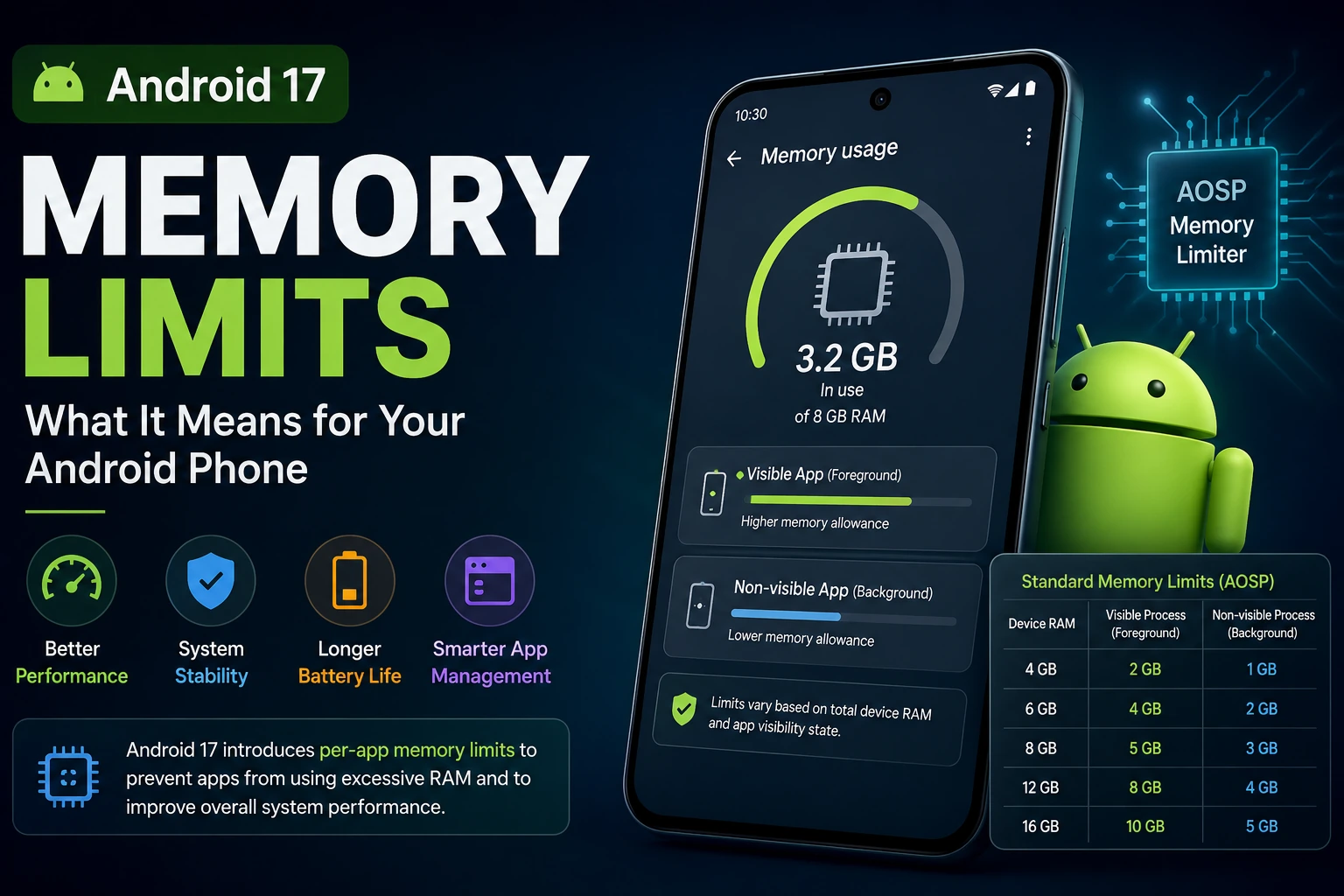
Android 17 introduces one of the more significant changes to Android memory management in recent releases: per-app memory limits.
The important point is that this does not mean your phone suddenly has less physical RAM. Instead, Android 17 can place a limit on how much memory an individual app process can consume. Google says the feature was introduced to prevent apps that use excessive memory from hurting overall system responsiveness, multitasking and battery efficiency.
The change initially started with Pixel devices, while Google says more manufacturers are expected to adopt per-app memory limits across devices ranging from 4GB to 16GB+ of RAM over the coming year.
For most phone owners, this should not mean constantly seeing apps close. The biggest impact is expected to be on memory-intensive apps, games and applications that have unusually large memory footprints or leaks.
What are Android 17 memory limits?
Android 17 adds a system component called Memory Limiter. It monitors application processes and applies memory limits based on the device’s available RAM and the process’s visibility state. The feature uses Linux cgroup v2 to enforce those limits.
A foreground application—the app currently visible on your screen—gets a more generous memory allowance than a non-visible process. Background processes are subject to tighter limits.
This is an important distinction from the traditional idea of an Android “RAM limit.” Android 17 is not simply saying, for example, that every phone with 8GB of RAM gives every app exactly 8GB.
Instead, the platform uses device memory and process state to determine how much memory a process can use.
Android 17 RAM limits by device memory
AOSP currently documents standard platform limits for several common RAM tiers. The figures below refer to the platform’s memory-limiter configuration and should not be interpreted as the amount of RAM available to the entire phone.
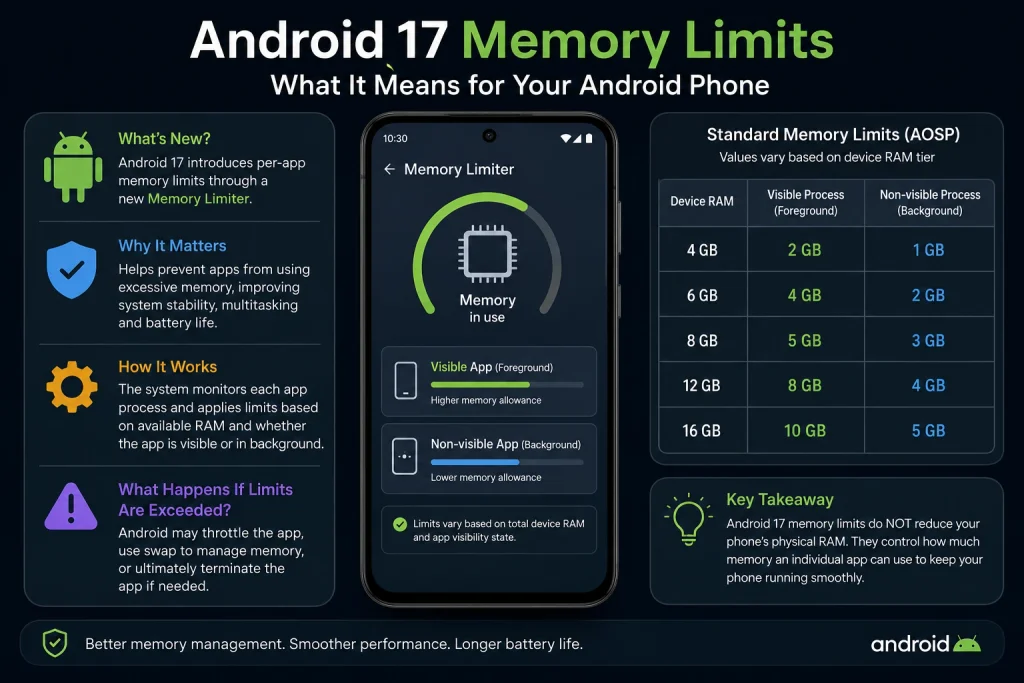
| Target phone RAM | Visible process memory limit | Non-visible process memory limit |
|---|---|---|
| 4GB | 2GB | 1GB |
| 6GB | 4GB | 2GB |
| 8GB | 5GB | 3GB |
| 12GB | 8GB | 4GB |
| 16GB | 10GB | 5GB |
The same configuration also defines swap limits for visible and non-visible processes. AOSP explains that the exact tier is selected using the memory reported by the kernel, rather than simply relying on the advertised RAM number on a phone’s specification sheet.
That distinction matters because some physical memory can be reserved for hardware such as the GPU, modem, camera subsystem and other components. As a result, the operating system’s reported MemTotal can be lower than the phone’s advertised physical RAM.
What happens when an app reaches its Android 17 memory limit?
Android 17 is designed to take action progressively rather than immediately terminating an application the instant it approaches a limit.
The Memory Limiter uses a soft memory threshold through the Linux memory.high control. When that threshold is exceeded, the kernel can throttle the process and attempt to reclaim memory.
Android 17 can also use swap or zRAM to handle memory pressure. Google explains that excessive use of compressed swap can introduce additional CPU overhead and may lead to visible performance problems such as UI stuttering.
If memory consumption continues beyond the available limits and the process cannot recover, Android can terminate the application process.
This means a memory-heavy application could experience:
- Reduced responsiveness
- UI stuttering
- Increased memory-reclamation activity
- Greater CPU overhead
- Process termination
- A cold restart when the user returns to the app
The goal is not to punish individual applications. The purpose is to prevent one poorly behaved process from consuming enough resources to degrade the experience of the rest of the phone.
Does Android 17 reduce your phone’s RAM?
No.
Android 17 memory limits do not physically remove RAM from your phone.
A phone advertised with 8GB of RAM still has its physical memory capacity. The change concerns how much memory an individual application process is allowed to consume under the platform’s Memory Limiter rules.
This is why an 8GB Android phone does not simply give one application unrestricted access to all 8GB.
Android must also reserve and manage memory for the operating system, other applications, hardware components and system services.
Google’s stated goal is to improve overall device stability and multitasking by preventing individual apps from consuming a disproportionate amount of memory.
What does this mean for Android 17 phones?
For ordinary users, the change should mostly work in the background.
If you use messaging apps, browsers, social networks, streaming services and typical productivity applications, you generally do not need to manually manage the Memory Limiter.
The bigger concern is software that legitimately needs large amounts of memory.
Examples include:
- High-end Android games
- Video editing applications
- Photo-processing applications
- Large creative applications
- Apps using large image or multimedia assets
- Poorly optimized applications with memory leaks
- Apps maintaining unnecessarily large caches or data structures
Google specifically highlights games and complex multimedia applications as areas where memory optimization is important.
Why games may be affected more than simple apps
Modern mobile games can load large textures, audio files, 3D assets, shaders and other resources into memory.
If a game continually increases its memory footprint, Android 17’s stricter memory management can become relevant.
Google’s Android game-development documentation says the Memory Limiter monitors application processes and applies different limits depending on whether a process is visible or non-visible. It also recommends monitoring memory usage and optimizing assets to avoid performance degradation and termination.
For game developers, this makes memory profiling more important than simply checking whether an application appears to have enough RAM on a particular phone.
Android 17 memory limits are not the same as the old Android heap limit
There is another important distinction.
Android applications have historically had runtime heap constraints, and developers have long needed to avoid excessive allocations and memory leaks.
The Android 17 Memory Limiter works at a broader process/system level.
Google describes the Android 17 metric as Total Memory Footprint, calculated from Anonymous RSS plus uncompressed swap. File-backed memory and GPU-private memory are treated differently from these components.
That means developers should not assume that checking only the Java/Kotlin heap tells them the complete story of how their process is consuming memory.
Native memory and other process-level allocations can also matter.
How developers can detect Android 17 memory problems
Android 17 adds additional tools for identifying memory-related problems.
Google recommends using Android Vitals and memory profiling tools to understand memory behavior in real-world applications. Android 17 also adds memory-related profiling triggers through ProfilingManager.
One of the new triggers is TRIGGER_TYPE_OOM, which can help identify applications that experience an OutOfMemoryError.
Another is TRIGGER_TYPE_ANOMALY, which can trigger when the system detects anomalous application behavior, including excessive memory usage. Google says this can occur before the system takes action against an application that exceeds Android 17 memory limits.
For applications terminated by the Memory Limiter, ApplicationExitInfo can also provide information about the termination. Google’s documentation describes a Memory Limiter-related description that can identify the event.
What should Android app developers do?
The Android 17 change makes memory efficiency a more important part of application development.
Google recommends several practical approaches:
Optimize images and multimedia
Large bitmaps and media assets can consume substantial memory. Applications should load appropriately sized resources rather than keeping unnecessarily large versions in memory.
Find memory leaks
A memory leak can cause an application to retain objects or resources that are no longer needed.
Android Studio’s profiling tools can help developers identify these problems.
Reduce unnecessary resources
Apps should release resources that are no longer required, particularly when moving from a visible state into the background.
Optimize application code
Google recommends using R8 optimization to reduce application code and resource overhead where appropriate.
Profile real memory behavior
Developers should measure the application’s actual process-level memory footprint rather than assuming that the phone’s advertised RAM tells the whole story.
Will every Android 17 phone have exactly the same memory limit?
Not necessarily.
The Android platform defines standard memory-limit tiers, but manufacturers determine how Android is implemented on their devices.
Google’s August 19, 2026 developer update says the limits started with Pixel devices and that more manufacturers are expected to use per-app memory limits across different RAM configurations over the following year.
Therefore, Android users should not assume that every Android 17 phone from Samsung, Google, Motorola, OnePlus, Xiaomi or another manufacturer will have identical memory behavior at the same moment.
The manufacturer’s Android build and memory configuration still matter.
What should users do if an Android 17 app keeps closing?
If an application repeatedly closes or restarts after an Android 17 update, do not automatically assume that the phone has a defective RAM module.
First, check whether the application has an available update.
Then:
- Update the affected app through Google Play.
- Install the latest available Android system update.
- Restart the phone.
- Check whether the problem occurs only in one application or across multiple applications.
- If the problem is limited to one memory-intensive app, report the behavior to its developer.
- Avoid assuming that a phone with more advertised RAM automatically eliminates application memory problems.
A single app repeatedly failing while other applications work normally can point toward an application-level memory problem rather than a general shortage of physical RAM.
What Android 17 memory limits mean for 4GB, 8GB and 16GB phones
The new system is particularly interesting because the limits scale with available memory.
AOSP’s current standard configuration gives a 4GB-class device a visible-process memory limit of 2GB, while an 8GB-class device has a 5GB visible-process limit and a 16GB-class device has a 10GB visible-process limit.
So Android 17 is not applying one universal app-memory ceiling to every smartphone.
The limits are designed around different device memory tiers.
That also means buying a phone with more RAM can still matter for demanding workloads, even though Android 17 prevents individual applications from consuming unlimited amounts of memory.
The bigger change is better memory discipline
The most important takeaway from Android 17 is not that Google has suddenly made Android phones “use less RAM.”
It is that Android is becoming more proactive about controlling how individual applications consume system memory.
For users, that should help protect overall responsiveness when an application behaves badly.
For developers, it raises the cost of ignoring memory efficiency.
For demanding applications and games, memory profiling, asset optimization and leak detection are becoming increasingly important parts of Android development.
At the same time, users should avoid interpreting the documented limits as a simple “maximum RAM an app can ever use” number. Android’s Memory Limiter works with process state, available system memory, memory thresholds and swap behavior, so the actual behavior is more nuanced than a single RAM figure.
Bottom line
Android 17 memory limits are a real platform change, but they do not reduce the physical RAM inside your phone.
Instead, Android 17 introduces a Memory Limiter that can restrict how much memory an individual application process consumes. The standard platform configuration scales with device memory, gives visible processes more room than non-visible processes, and can throttle or eventually terminate processes that consume excessive memory.
For most users, the feature should remain largely invisible. Its biggest impact will be on applications that consume unusually large amounts of memory, especially demanding games and multimedia software.
For Android developers, however, Android 17 is a clear signal: memory efficiency is becoming a platform-level requirement, not merely a performance optimization.
FAQ
Does Android 17 limit how much RAM an app can use?
Yes. Android 17 introduces per-app memory limits through the Memory Limiter. The limits vary according to device memory configuration and process visibility.
Does Android 17 reduce the RAM in my phone?
No. Android 17 does not physically reduce the phone’s installed RAM. It limits how much memory an individual application process can consume.
What is the Android 17 RAM limit on an 8GB phone?
AOSP’s current standard configuration lists a 5GiB visible-process memory limit and a 3GiB non-visible-process memory limit for the 8GB RAM tier. These are platform memory-limiter values, not a statement that the phone only has 5GB of usable RAM.
Can Android 17 kill an app because it uses too much memory?
Yes. If an application continues consuming memory beyond the applicable limits and cannot recover, the system can terminate its process.
Will Android 17 make my phone slower?
Not necessarily. The feature is intended to improve overall system stability and responsiveness by preventing individual applications from consuming excessive memory. However, an application approaching its memory limit can experience throttling or performance degradation before termination.
Are Android 17 memory limits the same on every phone?
No. The standard limits are based on device memory tiers, and manufacturers may adopt the feature across different devices and configurations at different times. Google says the rollout began with Pixel devices and is expected to expand across more manufacturers.
Should Android users with 4GB or 6GB RAM worry about Android 17?
Not automatically. The platform has separate memory tiers for different amounts of RAM. Users should be more concerned if a particular application repeatedly crashes, restarts or becomes unstable during demanding workloads.
Is Android 17’s Memory Limiter the same as the Android Low Memory Killer?
No. Android has long used memory-pressure mechanisms including the Low Memory Killer. Android 17 adds a dedicated Memory Limiter that applies per-process memory limits using Linux cgroup v2.